

If your images are still being delivered as their original JPEG or PNG instead of a smaller AVIF or WebP, it's almost always one of a few simple causes. Work through the checks below and you'll usually spot it quickly.
First, confirm what's actually being delivered
Visit the front end of your site, right-click an image, and choose Inspect. In the Network panel, reload the page and click the image request. Look at the response Content-Type:
image/aviforimage/webp→ the image is optimized. You're all set.image/jpegorimage/png→ the original is being delivered. Continue below.
Common causes and fixes
1. Optimization isn't enabled (or the plan doesn't include it)
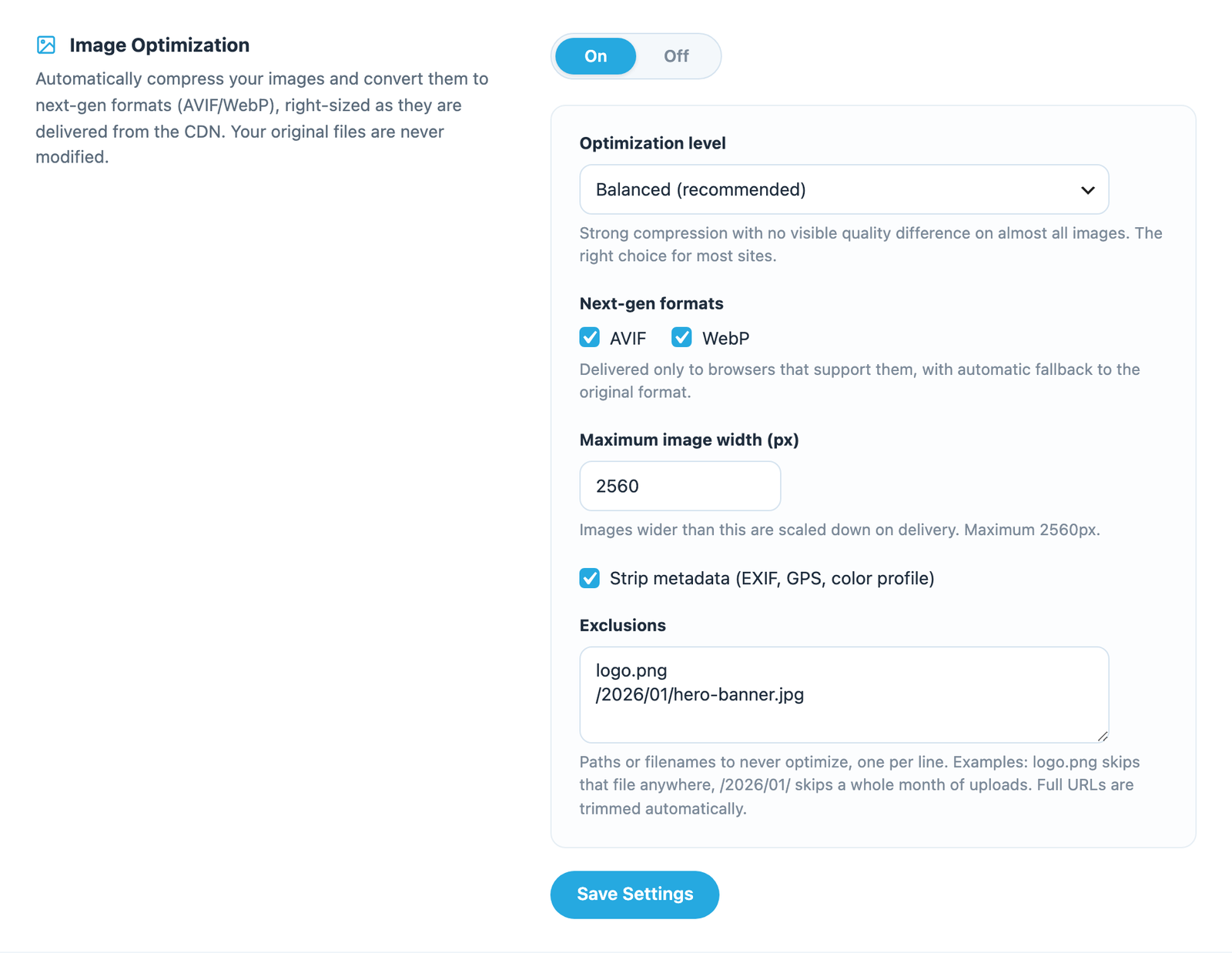
Open the Infinite Uploads menu and check the Image Optimization section. Make sure Enable Image Optimization is Yes and that you clicked Save Settings. If you see an Available on the Business plan message instead of the controls, Image Optimization requires a business plan. See Enabling Image Optimization.
2. The file type isn't optimized
Optimization applies to JPEG and PNG images. Other types (such as SVG, GIF, and files that are already WebP) are always delivered as-is. This is expected.
3. The browser you're testing in doesn't support next-gen formats
We only send AVIF or WebP to browsers that accept them. If you're testing in an older browser, you'll correctly receive the original. Test in an up-to-date Chrome, Edge, Firefox, or Safari, and confirm via the Content-Type check above.
4. The image is on your exclusions list
Check the Exclusions box in the Image Optimization section. If the file's name or path matches an entry there, it's being delivered untouched on purpose. Remove the entry if that's not what you want. See Excluding images from optimization.
5. The old copy is still cached
If you just enabled optimization or changed a setting, an already-cached original may still be serving. Click the Purge CDN Cache button, wait a moment, then re-check. See Purging the CDN cache.
Clear Your Cache
If everything is set correctly and you're still not seeing optimized images, be sure and clear your cache including:
- server-side object cache
- page cache
- browser caching
A page-cache or CDN layer in front of Infinite Uploads can serve an old version of the page and its image tags.
The image isn't served from Infinite Uploads at all
If the Content-Type check shows the image loading from a URL that isn't your Infinite Uploads CDN (https://xxxxx.infiniteuploads.cloud/), then it isn't going through optimization because it isn't being delivered by us. Confirm your media is offloaded and your CDN URL is active on the Infinite Uploads settings screen.