Video on a WordPress site is not just a file inside the Media Library. A reliable setup has to move a large upload, create playable versions, store the originals, deliver the right bitrate to each viewer, load a player, protect private content, and remain manageable as the library grows.
The best WordPress video hosting choice depends on the job. A short public marketing clip may work well as an MP4 on the site or a YouTube embed. A paid course, membership library, publisher archive, or client portal usually needs more control over branding, access, privacy, and delivery. The important question is not only “Where can I upload a video?” It is “Which system owns each part of the video pipeline?”
Quick recommendation by site type
Use this as a starting point, then evaluate the full workflow below:
| Site or project | Usually the best starting point | Why |
|---|---|---|
| A few short public clips | MP4 on a CDN or a public platform embed | The files are small, discovery may matter, and the workflow is simple |
| A marketing site with branded video | Managed WordPress video hosting or a controlled CDN | You keep the page experience and player closer to the brand |
| A course or membership library | Managed hosting with private access and adaptive streaming | Large files, multiple resolutions, and access rules matter more than public reach |
| A publisher or archive | Owned storage plus CDN and a repeatable encoding pipeline | Portability, metadata, captions, and predictable delivery are important |
| An agency managing several sites | A standardized managed platform or documented object-storage stack | Consistent onboarding, monitoring, permissions, and migration reduce support work |
| A tiny internal site | Direct MP4 delivery may be sufficient | Avoid building a six-layer system for a handful of low-traffic files |
Why ordinary WordPress hosting struggles with large video
WordPress can accept video uploads, but the origin server is rarely a complete video platform. A large upload can consume PHP workers, hit a request timeout, fill local disk, or fail when a connection is interrupted. Serving every viewer directly from the same web server adds bandwidth and connection pressure to the site that also handles the admin, database, and HTML pages.
Video also has a wider range of playback conditions than a typical image. One visitor may be on a fast desktop connection while another is on a congested mobile network. A single 1080p MP4 cannot adapt smoothly to both. A production setup may need multiple renditions, a streaming manifest, byte-range requests, a poster image, captions, and a player that reacts to the viewer's bandwidth.
That does not mean every site needs an expensive platform. It means the tradeoffs should be explicit. Direct MP4 delivery is simple. Adaptive streaming is more resilient. A public platform supplies reach and infrastructure but gives you less control. Managed WordPress video hosting removes much of the infrastructure work while keeping the publishing workflow close to WordPress.
The six layers of a WordPress video stack
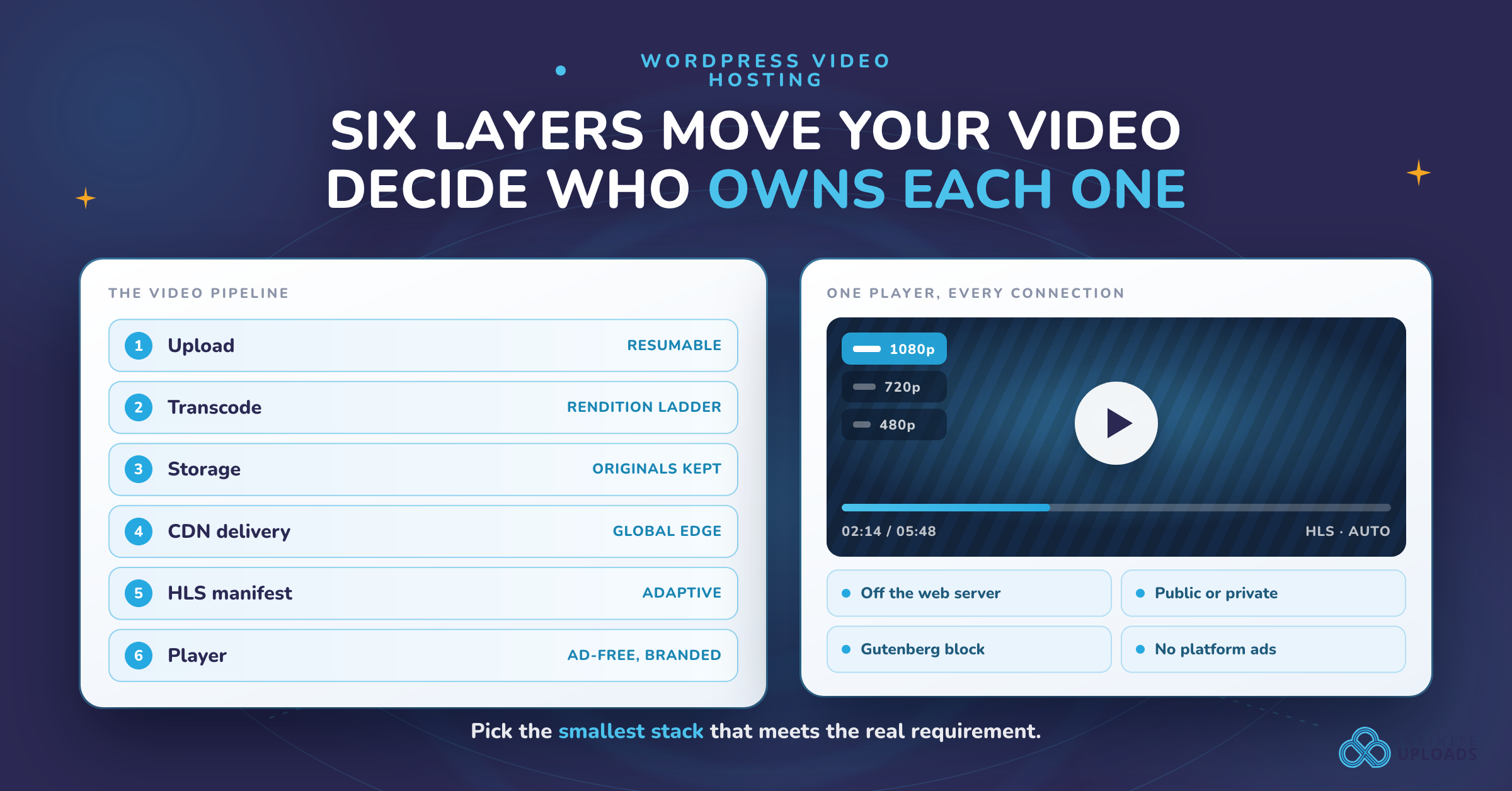
Treat these as separate responsibilities. A plugin that adds a video block may handle only the last layer, while a video platform may handle all six.
- Upload: Move the original file from the browser to a durable destination. Resumable uploads matter for multi-gigabyte files and unreliable connections.
- Transcode: Create compatible versions with appropriate codecs, dimensions, frame rates, and bitrates. Transcoding should happen outside the web request when possible.
- Storage: Keep the original and generated renditions in a location with enough capacity, durability, and retention control.
- CDN delivery: Put video close to viewers and support range requests, caching, and regional traffic patterns.
- Streaming manifest: For adaptive playback, package the renditions into a manifest such as HLS. The manifest tells the player which segments and quality levels are available.
- Player and experience: Render controls, captions, poster images, chapters, privacy behavior, responsive sizing, and analytics without slowing the page.
When comparing a WordPress video hosting plugin, ask which of these layers it actually provides. “Video player” does not necessarily mean storage, encoding, or CDN delivery. “Cloud storage” does not necessarily mean adaptive streaming. “CDN” does not create an encoded video ladder by itself.
Self-hosted WordPress, YouTube, Vimeo, or managed WordPress hosting?
There are four common arrangements:
| Option | Best fit | Control | Maintenance |
|---|---|---|---|
| WordPress origin | A small library, low traffic, or controlled internal use | High over files and markup, but limited by the hosting environment | You own uploads, encoding, backups, bandwidth, and incidents |
| YouTube | Public discovery, broad reach, and low infrastructure overhead | Lower branding and playback control; platform suggestions and policies apply | Low technical maintenance, but you depend on the platform |
| Vimeo or a similar hosted platform | Branded embeds, sharing, and a polished hosted workflow | More player and privacy controls than a public social platform, subject to plan limits | Low-to-medium; provider handles delivery and encoding |
| Managed WordPress video hosting (such as Infinite Uploads) | Owned video embedded in WordPress with less infrastructure work | High control over the page and workflow; verify access, export, and analytics details | Provider handles much of storage, encoding, CDN, and player infrastructure |
“Self-hosted” needs a precise definition. A file stored on the same WordPress origin is one form. A file owned by you in object storage and delivered through your CDN is another. A managed WordPress platform can still be an owned-content strategy even though the infrastructure is operated by a vendor. Compare who controls the account, source files, delivery URLs, access rules, and export process rather than using the label alone.
When YouTube is the right answer
Choose YouTube when discovery and public reach are primary, the platform's branding and recommendation behavior are acceptable, and the video is not sensitive. It is often the simplest way to publish a public explainer or tutorial. It is a weaker fit for paid content, a distraction-free course interface, strict data-minimization requirements, or a player that must look exactly like the rest of the site.
When Vimeo or a similar platform is the right answer
A hosted video platform can provide a cleaner embed, configurable privacy, and less operational work than running your own encoding stack. Read the current plan documentation carefully: limits may apply to storage, bandwidth, domains, seats, analytics, downloads, or private playback. Confirm whether you can export originals and whether the player adds cookies or third-party requests that require consent.
When managed WordPress video hosting is the right answer
Managed WordPress hosting is compelling when editors want to upload and insert video from WordPress, but the site should not make the web server handle every large file and rendition. Infinite Uploads' managed WordPress video-hosting workflow includes cloud storage, automatic transcoding, adaptive playback, global edge delivery, a Gutenberg block and shortcode, and player controls such as autoplay, loop, preload, mute, and color customization. Confirm current plan limits before making these capabilities a project requirement.
Why Infinite Uploads is a practical middle path
Infinite Uploads sits between serving every video from the WordPress origin and handing the entire viewing experience to a public platform. Editors keep the WordPress publishing workflow and can insert video with a Gutenberg block or shortcode, while the service handles the storage, encoding, adaptive delivery, and player infrastructure described above. That makes it a strong fit for marketing sites, course libraries, publishers, and agencies that want video on their own site without assembling and maintaining each infrastructure layer themselves.
Choose Infinite Uploads when you want to:
- Keep video publishing inside WordPress while moving large files off the web server.
- Deliver adaptive playback through a global edge network instead of one origin connection.
- Use a customizable, ad-free player that matches the surrounding site more closely than a public-platform embed.
- Keep public and private video workflows in the same WordPress media system, subject to the access controls and limits of the current plan.
Start with the Infinite Uploads video-hosting workflow, review the customizable video player, and confirm current pricing and account limits before migrating a library.
MP4 progressive download versus HLS adaptive streaming
An MP4 can be delivered progressively. The browser requests the file, often using byte ranges, and starts playback before the full download finishes. This is easy to understand and can be perfectly adequate for short clips, low traffic, or a controlled audience.
HLS divides a video into short segments and uses an .m3u8 manifest. The manifest can offer several renditions, allowing the player to move between quality levels as bandwidth changes. That usually creates a more resilient experience for longer videos and mixed networks, but it requires packaging and a player that supports HLS. WordPress core does not automatically turn an uploaded MP4 into an adaptive HLS ladder.
Read Understanding HLS video streaming for WordPress for the manifest and segment model, and compare the tradeoffs in the best WordPress video formats and encoding practices.
Do not choose HLS only because it sounds more advanced. Check the length of the videos, audience connection quality, device mix, encoding cost, caching behavior, and whether private access must apply to every segment as well as the initial page.
Performance and Core Web Vitals
Video can affect performance even when it is below the fold. A page may load a poster image, player JavaScript, tracking scripts, font files, and an iframe before the visitor presses play. A few practical controls help:
- Use a correctly sized poster image and compress it like any other important page image.
- Reserve the player’s aspect-ratio space so playback does not cause layout shift.
- Avoid autoplay with sound. If autoplay is necessary, test muted behavior and mobile data use.
- Lazy-load below-the-fold players and third-party embeds.
- Load player scripts only where a player exists.
- Prefer a CDN with range-request support and a cache policy appropriate for video segments.
- Measure the page with and without the player, then test on a real mobile connection.
A CDN reduces distance and origin load; it does not fix a poor encode, oversized poster, blocking script, or badly configured player. Review how a WordPress CDN works and WordPress video compression.
Privacy, cookies, data transfers, and access control
Hosting a file on your own site does not automatically make video processing privacy-neutral. The player, CDN, analytics, fonts, consent tool, IP logs, referrers, and embedded provider can all affect the data path. A “private” page can still expose a predictable media URL or allow a viewer to share a session token.
Before choosing a provider, document:
- Whether the player sets cookies before consent.
- Which requests go to third parties and which regions process them.
- Whether direct media URLs can be signed, expired, or restricted by domain.
- Whether private videos are hidden from search and from public media indexes.
- How access is revoked when a member cancels.
- Which logs and analytics are retained, for how long, and by whom.
Use the WordPress video privacy and GDPR guide as an implementation checklist, not as a legal guarantee. Your consent configuration and vendor contracts still need a site-specific review.
Captions, transcripts, chapters, and accessibility
Accessible video is more than a play button. Provide accurate captions for spoken content, a transcript when it helps people search or read, a descriptive title, keyboard-operable controls, sufficient contrast, and a poster image that communicates what the video contains. Chapters can make long lessons or demonstrations easier to navigate.
Ask whether the workflow preserves caption files during migration and whether captions are delivered with every rendition. Test keyboard navigation, screen-reader labels, focus order, captions on mobile, and playback when scripts are blocked. If a video is essential to understanding the page, provide an equivalent text explanation rather than relying on the video alone.
The real cost of WordPress video hosting
Monthly price is only one line in the model. Estimate:
- Storage: original files, encoded renditions, caption files, thumbnails, and backups.
- Encoding: the compute or per-minute charge for creating the rendition ladder and re-encoding after changes.
- Delivery: bandwidth and requests, especially for long videos, repeat viewers, downloads, and uncached segments.
- Operations: monitoring, failed uploads, cache purges, access support, and migration work.
- Player and analytics: seats, branded player features, event tracking, or third-party tools.
Compare the same scenario across providers: number of new minutes each month, average source size, encoded minutes, monthly plays, average watch percentage, peak concurrent viewers, retention period, and download behavior. A low storage price can become expensive when delivery is metered. A higher managed-service price can be cheaper than engineering and maintaining uploads, encoding, private access, and incident recovery yourself.
Migration and ownership questions
Before moving a library, obtain a sample export and test it. Confirm that the provider can return originals, captions, thumbnails, metadata, and any access-control mapping you need. Inventory where the current URLs are used: posts, pages, custom fields, membership rules, email campaigns, documentation, and external apps.
Use a staging site to migrate a representative set of short, long, public, private, captioned, and high-resolution videos. Check redirects or URL rewrites, poster images, captions, seek behavior, cache headers, HLS manifests, and access revocation. Keep the original source files until the new library has passed a restore test.
Recommended setups by workflow
Courses and memberships
Use a managed platform or owned object storage with adaptive streaming, private playback, captions, and membership-aware access. Avoid public platforms when the lesson itself is the product. Test whether a logged-in user can copy a direct URL and continue playing after access is removed.
Publishers and archives
Prioritize durable originals, structured metadata, captions, transcripts, predictable URLs, and an export path. Keep the player lightweight and separate editorial metadata from delivery infrastructure so a future migration does not require rewriting every article.
Agencies
Standardize the upload, naming, access, retention, and rollback process. Document who owns the account and how a client receives originals. A managed WordPress video platform can reduce per-site infrastructure, but verify multi-site permissions and billing before consolidating clients.
Marketing sites
Use a branded player or a carefully configured embed, a responsive poster, lazy loading, and a clear consent strategy. Public discovery may justify YouTube for top-of-funnel content, while product demos and customer stories may benefit from a controlled player on the company domain.
A practical WordPress implementation sequence
- Inventory the current library, average file sizes, traffic, privacy needs, and captions.
- Decide whether the default playback should be progressive MP4 or adaptive HLS.
- Choose the ownership model: WordPress origin, public platform, hosted provider, or managed WordPress video hosting such as Infinite Uploads.
- Test a representative sample on staging, including a failed or interrupted upload.
- Configure poster images, responsive sizing, captions, privacy, and consent behavior.
- Confirm CDN caching, range requests, HLS segment delivery, and mobile playback.
- Add monitoring for failed encodes, broken manifests, storage growth, and unusual delivery costs.
- Publish a rollback and export procedure before migrating the whole library.
For a WordPress-native workflow, Infinite Uploads provides a Gutenberg block and shortcode alongside cloud storage, transcoding, adaptive playback, and edge delivery. Its customizable video player provides the relevant player controls. Confirm current account requirements and limits before implementation.
Evaluation checklist and troubleshooting
Use these questions in a vendor trial:
- Can a multi-gigabyte upload resume after a dropped connection?
- Are originals and renditions stored separately and recoverably?
- Which codecs, resolutions, and frame rates are created?
- Does the service create HLS, and can the player switch quality levels?
- Are captions, transcripts, chapters, and poster images supported?
- Can access be restricted by login, domain, token, or expiration?
- What cookies, analytics requests, and regional transfers occur?
- Are URLs stable if the storage location changes?
- Can you export originals and metadata without a proprietary player?
- How are storage, encoding, delivery, requests, and seats billed?
- What happens when a plan is downgraded, cancelled, or over its allowance?
If playback fails, inspect the browser network panel first. A 403 often points to an expired token or domain restriction; a 404 can indicate a missing manifest or segment; stalling can indicate a poor encode, unsupported range requests, or an origin that is too slow. If the player loads but captions do not, check the caption URL, MIME type, language metadata, and cross-origin policy. Test the direct manifest and a segment separately before changing the WordPress block.
Frequently asked questions
Is WordPress good for hosting video?
WordPress is a good publishing and editorial layer for video. Whether the WordPress origin should store and deliver every byte depends on file size, traffic, network conditions, privacy, and operational capacity. Small libraries can work well with direct MP4 delivery; larger libraries usually benefit from separate storage, encoding, and CDN delivery.
What is the best video hosting for WordPress?
There is no universal best provider. Choose based on audience reach, player control, privacy, adaptive streaming, captions, exportability, support, and the total cost of storage plus delivery. A public platform, hosted video provider, and managed WordPress service solve different problems.
Is self-hosted video more private?
It can reduce dependence on a public platform, but it is not automatically private. Your CDN, player, analytics, logs, direct URLs, and access rules still matter. Document the complete request path and test revocation before calling a video private.
Does a CDN replace video encoding?
No. A CDN distributes files; an encoder creates playable versions. Adaptive streaming normally needs both a rendition ladder and a manifest-aware delivery path.
Do I need a WordPress video hosting plugin?
Not always. A plugin is useful when it connects WordPress editing to uploads, storage, encoding, delivery, and playback. If those responsibilities are already handled by a platform or a carefully managed storage stack, a lightweight block or embed may be enough.
Choose the smallest video stack that meets the real requirement
The right WordPress video hosting architecture is the smallest one that handles your audience, video length, privacy, accessibility, and growth without creating hidden operational work. Start with the six layers, test a realistic sample, and compare total ownership cost—not just the monthly storage line.
If you want owned video inside WordPress without building every layer yourself, start with the Infinite Uploads video-hosting workflow and compare it with the public-platform and self-hosted options above.