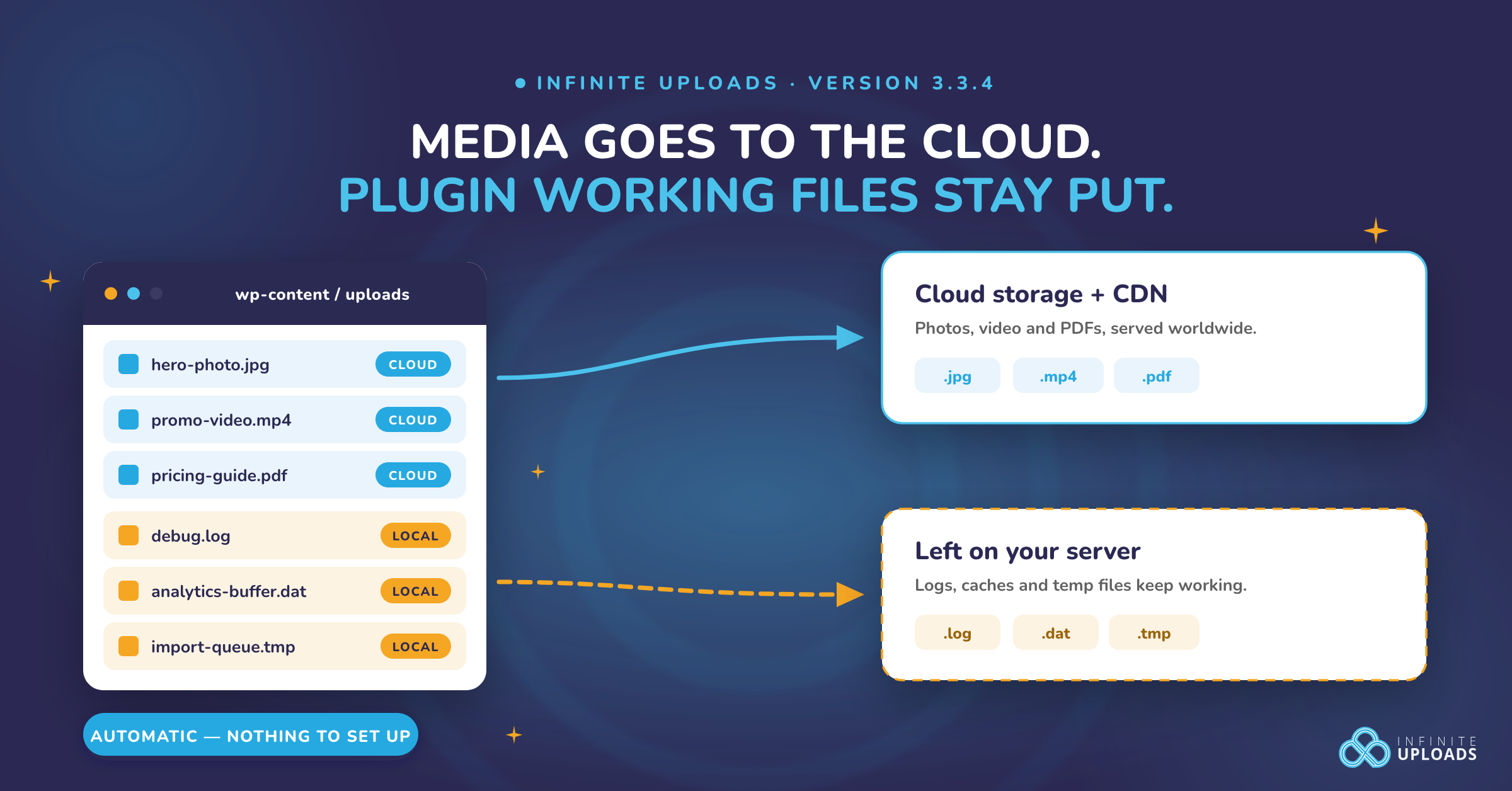
Your plugins write more into your uploads folder than you think. Not just images. Logs, caches, import files, analytics buffers, template files. When you offload that folder to the cloud, some of those plugins stop working, and the error never tells you why. We just shipped a fix for that, and there's nothing for you to configure.
Infinite Uploads 3.3.4 now recognizes plugin working files and leaves them on your server. Your photos, videos and PDFs still go to the cloud and still get served from the CDN. The files your plugins are actively scribbling in stay put, where they keep working. It's on by default the moment you update.
Getting there meant scanning the top 10,000 plugins on WordPress.org. Here's how that worked, and what it found.
What was actually breaking
When Infinite Uploads is on, your uploads folder stops being a folder on your server. It becomes a pointer to cloud storage. Whole files go up and come down exactly the way you'd expect.
Think of it like swapping the filing cabinet in your office for a courier service. Hand over a document, get a document back, all day long, no problem. Now try scribbling one more line onto a page that's already out in the van.
Plenty of plugins scribble. Here's Koko Analytics, a genuinely good analytics plugin, writing one line per pageview into a buffer file:
// koko-analytics/src/Resources/functions/collect.php:249

return (bool) file_put_contents(
    $filename,
    $content . PHP_EOL,
    FILE_APPEND | LOCK_EX
);
That's correct, careful PHP. It appends instead of rewriting, and it takes a lock so two visitors landing at once don't corrupt the file. On a local disk it's exactly right. Against cloud storage, appending to the middle of an existing object and locking it are not operations that exist. The write fails, and your pageview counts quietly stop.
None of that is bad code. It's code written for a local disk, because for two decades that's exactly what your uploads folder was.
How we scanned 10,000 plugins in one afternoon
We used to handle this one plugin at a time. You'd email us that something broke, we'd dig in, find the cause, and ship a fix for that one plugin. That works, and it's also hunt and peck when the plugin directory holds tens of thousands of plugins and you're running whatever combination your site needs.
So we built a scanner instead, with GPT doing the pattern work. Not reading 10,000 plugins line by line. Writing the rules that decide what's worth a human look.
The naive version of this is a grep for wp_upload_dir. That fails immediately, because almost nobody writes to the uploads folder in the same line where they ask for its path. They assign it to a variable, pass it through two or three more, build a filename off it, and write ten functions later. Grep finds the question. It never finds the answer.
So the scanner tracks the path instead. It starts from the places an uploads path can enter the code:
ROOT_SOURCE_RE = re.compile(
    r"(?i:\b(?:wp_upload_dir|wp_get_upload_dir)\s*\()|\bUPLOADS\b"
)
Then it follows every variable those values get assigned into, and every variable THOSE get assigned into, repeating until nothing new turns up:
for _ in range(4):
    changed = False
    for _, statement in statements:
        match = ASSIGN_RE.search(statement)
        if not match:
            continue
        lhs, rhs = match.group("lhs"), match.group("rhs")
        source = bool(sources.search(rhs))
        propagated = any(var in tainted for var in VAR_RE.findall(rhs))
        if (source or propagated) and lhs not in tainted:
            tainted.add(lhs)
            changed = True
    if not changed:
        break
Four passes is enough. Past that, plugins have almost always either written the file or handed the path off to something the scanner can't follow anyway.
Once it knows which variables carry an uploads path, it looks at what the code DOES with them and scores the result. A plugin loading PHP out of uploads is a guaranteed break, so it scores 100. A plugin that merely reads a file there is usually fine, so it scores 60 and nobody gets paged about it.
if "php_include" in kinds:
    rule, score = "UPLOAD_PHP_INCLUDE", 100
elif "database" in kinds:
    rule, score = "UPLOAD_DATABASE", 100
elif "append_lock" in kinds:
    rule, score = "UPLOAD_APPEND_OR_LOCK", 95
elif "fopen_write" in kinds:
    rule, score = "UPLOAD_FOPEN_WRITE", 95
elif fwrite_handle:
    rule, score = "UPLOAD_FWRITE", 95
elif "local_only" in kinds:
    rule, score = "UPLOAD_LOCAL_FILESYSTEM_OP", 90
That ladder is the part that took the longest. The scanner that produced these results is version 7, and every version before it existed because we ran it, read the output, found it screaming about something harmless or missing something real, and tightened a rule. GPT was genuinely fast at that loop. Describe the false positive, get a narrower pattern back, re-run against 10,000 plugins, look again.
The final run took two hours and nineteen minutes, start to finish. That's pulling the plugin list from the WordPress.org API, downloading 10,000 plugin archives, unpacking every one, and scanning all of it. 749 lines of Python. Zero archives failed to download or parse.
What the scan found
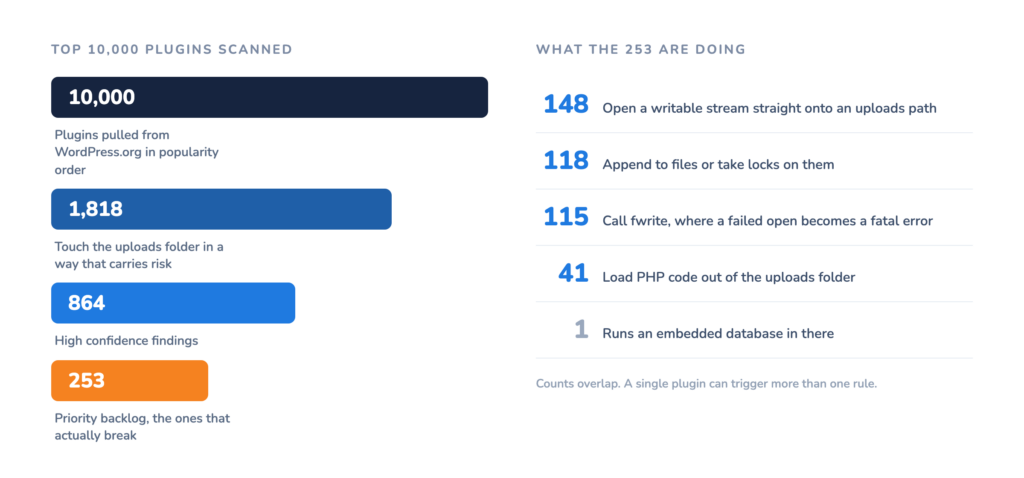
- 1,818 plugins touch your uploads folder in a way that carries some risk.
- 864 of those hit our high confidence threshold.
- 253 went into a priority list, the ones loading PHP, appending, locking, or writing raw streams into uploads.
A static match is a candidate, not proof, so we read the top of that list by hand. Roughly half the PHP loading findings turned out to be false alarms, usually the scanner catching a path that only looked like it came from uploads. WooCommerce showed up early and turned out to be completely fine. It checks whether a path is cloud storage before it writes there, which is exactly what you want a plugin to do.
The real ones were very real. Ajax Load More opens its repeater template for writing with a plain fopen( $f, 'w+' ), then writes to the handle without checking it came back valid. Against cloud storage that open returns false, and the write turns a broken feature into a fatal error.
Why patterns beat a list of plugin names
Reading down that priority list, the same folder names kept showing up.
- 27 plugins write to a folder with "log" in the name.
- 10 use "temp".
- 9 use "import".
- 7 each for "backup", "export", and "cache".
- 13 different plugins from one developer all write into the same shared folder.
That's not 253 separate problems. It's about six shapes and a short list of known names.
Which matters to you for a practical reason. Nobody can ship 253 individual plugin patches and keep them current as all 253 plugins keep updating. Rules that recognize what plugin scratch space looks like cover plugins we've never tested, including the one you install next month. Spam filtering went through the same shift years ago. Nobody blocks junk mail one sender at a time anymore.
What we were careful not to exclude
Rules that keep files local are only good if they keep the RIGHT files local. An early version of ours matched folder names loosely, and that quietly caught real media. A photo gallery in a folder called "logos" matched the "log" rule. A set of images in "templates" matched "temp".
We caught it before release and tightened the rules to match whole words only. Every one of those cases now has a test behind it, so your gallery folder never gets mistaken for a log folder.
Getting it
Update to 3.3.4. That's the whole step. The rules are on by default and you never have to find out which of your plugins were on that list.
A few plugins needed more than a rule. WP All Import, Ajax Load More, Koko Analytics and several others now get their own path settings pointed back at your local disk, so they never go looking in the cloud for their working files at all. 3.3.4 also fixes WP All Export product exports, comment uploads through wp-comment-fields, and a few payment gateway integrations that were writing exactly where we were sweeping.
Already offloaded before you update? You're covered. If a plugin's working file went to the cloud under the old rules, Free Up Local Storage will not delete your local copy of it now.
Ready to get your media off your server?
Update the plugin from your WordPress dashboard and the new compatibility rules come with it. New to Infinite Uploads? Start offloading your WordPress media today and get it onto a fast global CDN without breaking the plugins you already run.
We'll run the scan again. The plugin directory doesn't hold still, and neither do the plugins inside it. The next pass goes after the 70 plugins that build their paths dynamically, where static analysis runs out and someone has to read the code. More is on the way.