

This document covers how Infinite Uploads handles unexpected traffic spikes, including DoS/DDoS-type activity, and how to protect your media usage by integrating Cloudflare with your Infinite Uploads setup.
When sites experience unusually heavy or malicious traffic, bandwidth usage can increase rapidly. This guide explains what Infinite Uploads can (and cannot) mitigate, how billing is affected, and how Cloudflare can be used to prevent unwanted usage.
Understanding Traffic Spikes and Attacks
Infinite Uploads is designed to store and deliver media files from the cloud. Because the service focuses on file delivery rather than traffic filtering, Infinite Uploads does not include built-in protection against DoS or DDoS attacks.
If high-volume or malicious traffic reaches your site’s media URLs directly, those requests will be served like normal traffic and will count toward your plan usage. Of course, if the DDoS takes down your site, your media files won’t be served.
How Infinite Uploads Handles Unusual or Attack-Level Traffic
Infinite Uploads does not have the ability to identify or block DoS/DDoS attacks at the CDN layer. Any mitigations would need to occur before traffic reaches our servers.
At this time:
- Automatic plan upgrades cannot be disabled.
If your usage exceeds your plan limits, your account will auto-upgrade as part of normal billing behavior. - Support can disable your CDN on request.
If you notice sudden, unexplained spikes in traffic or suspect you are under attack, contact support.
We can temporarily turn off your CDN, halting delivery of media files while you address the issue on your end.
Disabling the CDN stops usage immediately but also prevents media from being served until re-enabled.
Using Cloudflare to Protect Your Media Library
Infinite Uploads works fully with Cloudflare, and we highly recommend using Cloudflare if you expect high traffic volumes or want protection against DoS/DDoS events.
Cloudflare can provide:
- DNS-level protection
- CDN caching
- Firewall and bot filtering
- Rate limiting
- Challenge pages for suspicious traffic
Because Cloudflare sits in front of your Infinite Uploads media URLs, it can filter or block malicious requests before they reach Infinite Uploads, preventing unnecessary usage charges.
Cloudflare has an extremely generous free plan used by millions.
Can Cloudflare Protect Media Offloaded with Infinite Uploads?
Yes. Cloudflare will proxy and protect your Infinite Uploads media URLs just like any other asset on your domain.
I already have CloudFlare, but I am still seeing a high amount of bandwidth
If you already have CloudFlare on your site, take a few easy steps to confirm your site is protected
Ensure your site is proxied
Even though your DNS is managed through Cloudflare, the records that point to your website still need to be proxied through Cloudflare’s network. That’s what the orange cloud icon means. If it’s grey, your traffic is bypassing Cloudflare entirely.
There are three record types to check:
- A record — This is your main website record. The hostname is typically
@, the root, or your bare domain URL, and it points to your web server’s IP address. Make sure the orange cloud is enabled. - WWW A record — If your
wwwsubdomain is set up as an A record, the hostname iswwwand the value is your web server’s IP address. Same deal: orange cloud needs to be on. - WWW CNAME record — Some setups use a CNAME for
wwwinstead. The hostname iswwwand the value points back to your root domain (sometimes written as@or the full URL). Enable the orange cloud here too.
If any of these are showing a grey cloud, click it to toggle proxying on. That’s the step most people miss.
Setup AI Crawl Control
AI crawlers browse the web to collect content for training large language models and AI-driven search engines. Crawlers from legitimate search engines drive real traffic. You want those. But a growing number scrape your content purely to feed their own AI systems with no intention of sending visitors your way.
If you’re using Infinite Uploads, every request to your cloud-stored media counts against your bandwidth. An aggressive crawler working through your image or video library runs up your usage while you’re not looking. Blocking them at the Cloudflare level stops those requests before they ever reach your media.
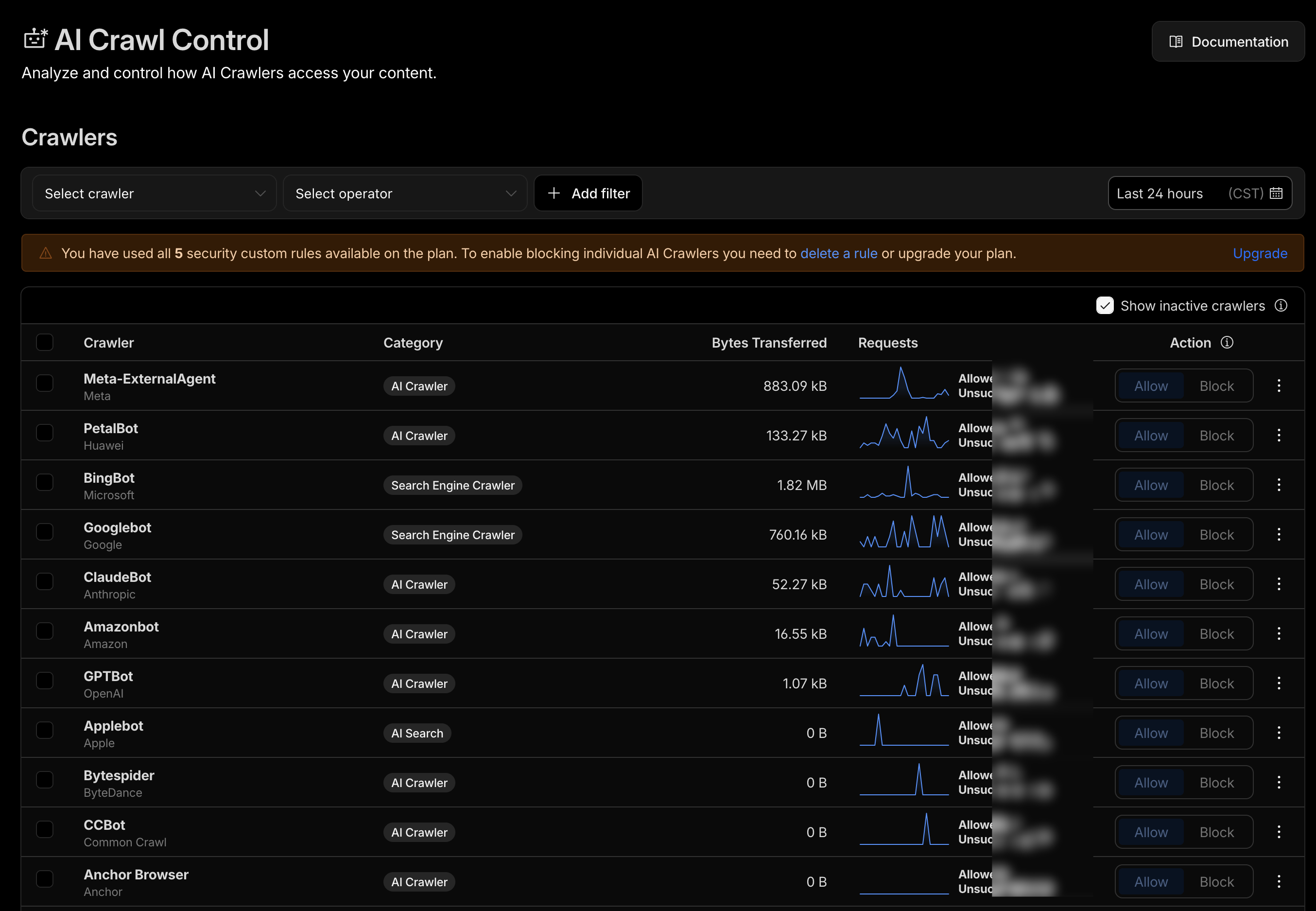
In CloudFlare, go to AI Crawl Control on the left hand menu, and then click on Crawlers.


Please block:
- Bytespider – Bytespider is a web crawler used by ByteDance to collect publicly available web content for indexing and training its AI systems.
- PetalBot – PetalBot is the web crawler operated by Huawei to index websites for its Petal Search engine and related AI-driven search services.
- Manus Bot – Manus Bot is a web crawler used by Manus AI to gather online content that supports its AI research and model training.
- Timpibot – Timpibot is the crawler for Timpi, a decentralized search engine that collects web data to build its distributed search index.
- Anchor Browser – Anchor Browser is a crawling agent run by Anchor that programmatically accesses websites to gather data for AI systems and automated browsing tasks.
- Novellum AI Crawl – Novellum AI Crawl is a web crawler operated by Novellum that collects publicly available web content for training and improving its AI models.
Cloudflare includes a CDN, but so does Infinite Uploads. How does that work?
Cloudflare and Infinite Uploads both provide CDNs, but they serve different roles and work together seamlessly. Cloudflare sits in front of your site as a DNS and security layer, filtering traffic, blocking DoS/DDoS attacks, applying firewall rules, and caching files at its edge locations. When a media file is requested, Cloudflare handles the request first; if the file isn’t already cached, it forwards the request to the Infinite Uploads CDN, which stores and delivers your media from its global network. Cloudflare then caches that file for future requests, reducing bandwidth usage on Infinite Uploads and adding an extra layer of protection. This setup combines Cloudflare’s security and traffic filtering with Infinite Uploads’ optimized media storage and delivery, improving performance while preventing malicious or excessive traffic from reaching your media library.
| Layer | Service | What it Does |
|---|---|---|
| Layer 1 – DNS/Edge Firewall | Cloudflare | Filters traffic, blocks attacks, adds caching before requests reach your server or media CDN. |
| Layer 2 – Media Delivery CDN | Infinite Uploads | Stores and serves your media files from high-performance storage and +45 global edge locations. |