The Infinite Cloud Loop Newsletter is back! Did you miss us?
To kick off the month of March, we're bringing you two resources that will make a big impact on your WordPress success: a small but mighty plugin and a guide to making the most of your featured images!
After that, we're spotlighting our powerful solution for agency owners. If you're tired of getting penalized with escalating hosting costs as you scale up, this one's for you.
Finally, we're excited to announce our new partner program: an official cross-promotion initiative designed to benefit both plugin developers and their users. One of the perks of joining? You'll be featured in future newsletters—just like the product partner we'll be highlighting today.
Let's jump into it!
In today's edition:
URL Image Importer for WordPress
An Experts Guide to Featured Images on WordPress
Infinite Uploads for Agencies
Our Product Partner Program
Featured Product Partner: Document Library Pro
Import Images Instantly with a URL: Use Our FREE WordPress Plugin!
Managing media in WordPress can be time-consuming, especially if you’re constantly downloading images just to re-upload them. The URL Image Importer solves this problem by allowing you to import images directly from any URL into your media library.
This small but mighty plugin:
- Eliminates the need for manual downloads
- Helps bypass file size restrictions
- Integrates with Infinite Uploads for cloud storage and performance optimization
Whether you’re a blogger, developer, or business owner, this tool streamlines your workflow and enhances your site’s efficiency.
Optimize Featured Images on Your WordPress Website

A WordPress Featured Image is a visual component that summarizes the whole post, page or custom post type.
It’s usually the first image users see when they view your post in a blog feed, on social media or search results. These images are placed at the top of blog posts and pages and act as a visual intro to the content.
Beyond that, featured images can also be used in sliders, galleries or as background images in certain parts of your website. They:
- Enhance the look and feel of your site
- Grab the attention of your readers
- Contribute to your brand
Using featured images effectively not only improves user experience but also SEO, as search engines love well-organized content with visuals.
Learn how to make the most of featured images on your WordPress site:
Infinite Uploads for Agencies
We get it—agency owners are constantly nickel-and-dimed for every site they manage or host. It’s frustrating, and those costs add up fast.
That’s why we offer simple, no-contract storage and bandwidth pricing that works for you.
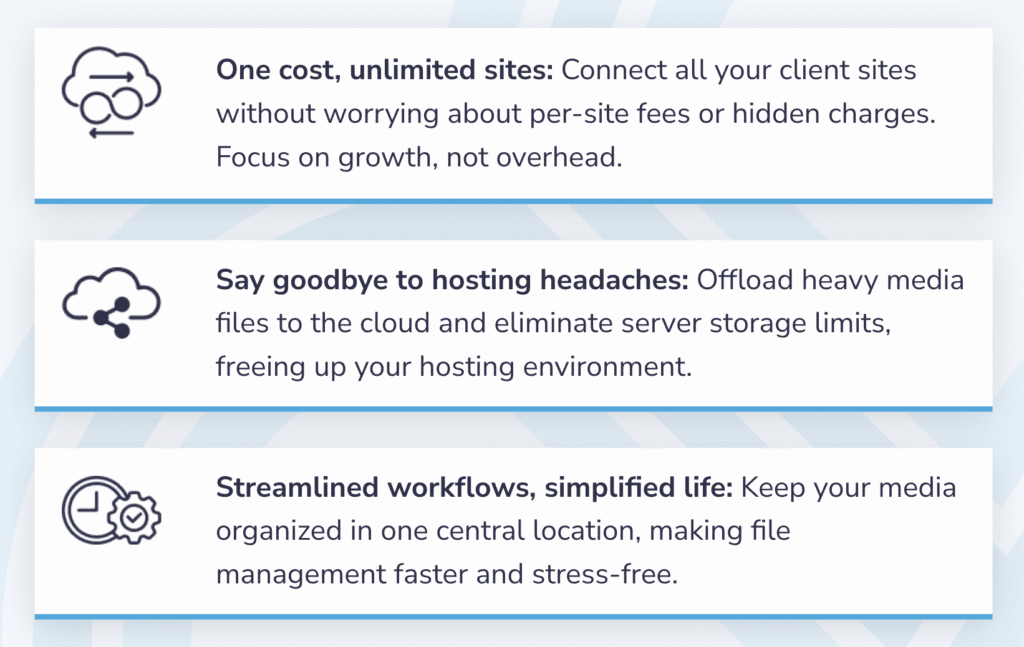
Unlike traditional hosting setups that penalize growth with escalating costs, we empower agencies to scale efficiently and affordably. Whether you manage 5 sites or 50, our pricing stays the same—and your peace of mind grows.
Here are just a few reasons why agencies LOVE Infinite Uploads:
Calling Plugin Developers: Join Our Product Partner Program!
The Infinite Uploads Product Partner Program is our official cross-promotion initiative designed to benefit both plugin developers and their users.
We’re passionate about the WordPress community and actively support its growth through sponsorships of leading WordPress podcasts, blogs, and events.
By partnering with us, you’re not just expanding your audience—you’re helping to create a stronger ecosystem where plugins work seamlessly together.
Curious about this opportunity? Learn more about how this partnership can benefit you and how to get started here:
Featured Product Partner

Store, Organize, and Display WordPress Media Without Hitting Hosting Limits!
Managing and displaying documents on a WordPress site can be challenging, especially if you’re dealing with large files or a massive document library.
That’s where Document Library Pro shines—it’s a powerful plugin that lets you organize, display, and search documents with ease. The document library page serves as a central hub for managing documents within WordPress, offering features like searchability and sortable columns to enhance user experience.
In this guide, we’ll explore why Document Library Pro & Infinite Uploads is the perfect combination for hosting and displaying offloaded documents on the front end of your WordPress site:
or
Watch Our Document Library Pro Video Tutorial

As always, we hope these resources help you get the most out of your WordPress site! Our goal is to give you the tools and know-how to run your site more smoothly, so you can create a better experience for everyone who visits.
Got any questions about the resources mentioned in this newsletter? Reach out to us—our friendly team is happy to help!
Until next time,
Blake Whittle
Owner, Infinite Uploads & ClikIT
| And don't forget, you can upgrade to Infinite Uploads at any time to get unlimited file storage and remove any size restrictions. Click here to learn more.P.S. Did you know, even if you're not an Infinite Uploads customer, you can earn as much as $3,300 in recurring passive income through our affiliate program? |