

Overview
When users upload videos through an Elementor form on your site, the uploaded files do not appear in the WordPress Media Library. Instead, they are stored and accessible through:
- Elementor → Submissions inside your WordPress admin panel
- Direct file URLs, which point to your Infinite Uploads CDN
This document walks you through how to locate those videos.
Step‑by‑Step: Accessing Uploaded Videos
1. Log in to Your WordPress Dashboard
Use your administrator credentials to access your website’s backend.
2. Navigate to Elementor Submissions
In the WordPress admin sidebar:
- Click Elementor
- Click Submissions

You will see a list of form submissions submitted through Elementor forms.
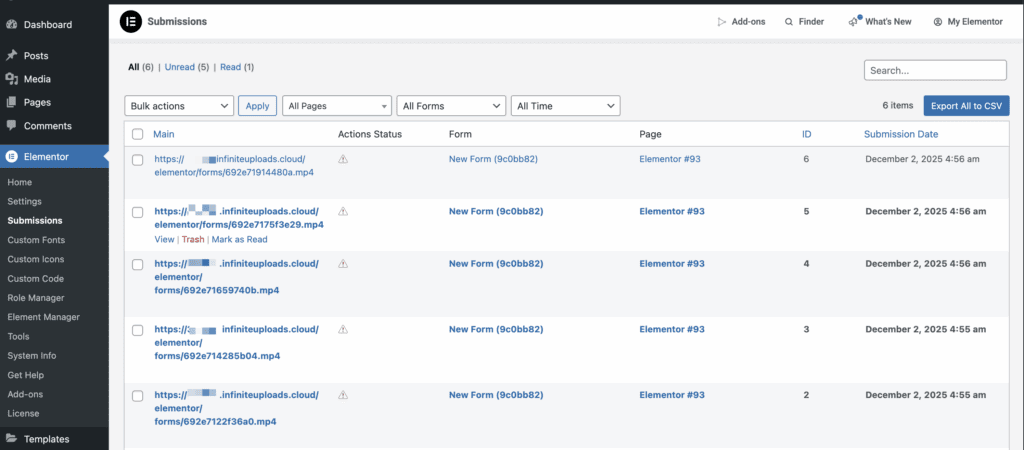
3. Open a Submission Entry
Select any submission to view the form fields and uploaded files.
You will see something like:
- A field labelled similar to:
field_50eca08or a nice name such asFile Upload - A URL that looks like:
https://<yourcdn>.infiniteuploads.cloud/elementor/forms/.../file.mp4
This URL is the direct link to the uploaded video.
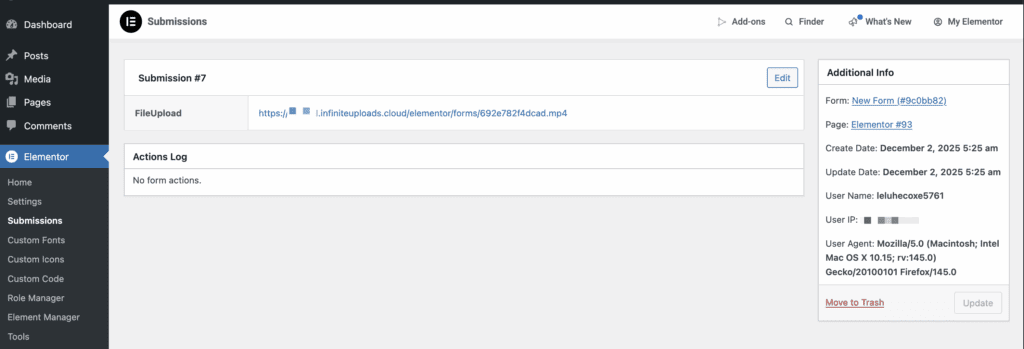
4. Access or Download the Video
Click the URL shown in the submission.
The video will open directly in your browser, or your browser may download it automatically depending on your settings.
This allows you to:
- Watch the video online
- Download it for review
- Share the video with others
Where the Files Are Stored
Videos uploaded through Elementor Forms are stored in your Infinite Uploads storage under:
elementor/forms/<form_id>/<unique_filename>.mp4
These videos are delivered through your site’s Infinite Uploads CDN.
Notes & Common Questions
Why don’t uploaded videos appear in the Media Library?
Elementor Form uploads bypass the Media Library and store files directly in the uploads directory (or in your Infinite Uploads storage if connected). This is expected behavior.
Do I need to log in to Infinite Uploads to view the files?
No. Each file has a direct CDN URL. You view or download it from the submission screen. There is no built-in privacy protection with this method of uploading videos (direct URL). A 3rd party plugin may achieve this, however.
Can I view all uploaded files from the Infinite Uploads Dashboard?
The fastest method to match videos to users is through Elementor → Submissions, since each file is tied to a specific form entry. If you have a Business plan, you can use FileZilla Pro or CyberDuck to connect to your cloud bucket directly, where you’ll find it in wp-content/uploads/elementor/forms